
Warehouse Wi-Fi Is Not Office Wi-Fi
High ceilings, steel, racking, forklifts, and scanners that cannot drop. We design and deploy wireless and network infrastructure built for the floor. On-site across Ontario and throughout Canada.
Limited availability for in-person visits each week.
What Wi-Fi problems in a Warehouse Looks Like
These are the failures we see most often on warehouse and distribution floors across Ontario, and the ones a proper deployment prevents.
Scanners Drop Mid-Aisle
Handheld scanners lose connection as workers move through the building, so scans fail and the floor backs up.
Dead Zones in the Racking
Tall metal racking absorbs and blocks signal, leaving gaps that a software coverage map never predicted.
Forklifts Losing Connection
Wi-Fi guided and automated forklifts drop their link in transit, which is both an operations and a safety problem.
Printers That Won't Stay Connected
Label, RFID, and laser printers with weak internal antennas struggle to reach a distant access point.
Too Many Access Points, Worse Performance
Access points were added to patch dead spots, and now they interfere with each other and slow the whole floor.
A Network That Was Never Surveyed
The wireless was designed on a floor plan and never validated on site, so the building keeps producing surprises.
Why It Is Different
Why a Warehouse Is Not Just a Big Office
The single most expensive assumption in this work is that a warehouse is just a larger office. It is not. Four things make it a fundamentally different environment, and each one changes the design.
A warehouse ceiling can be 12 metres or more of open steel. Signal travels far further to reach the floor, arriving weaker and wider than in an office. This often calls for directional antennas that aim a tighter, stronger column downward instead of splashing signal everywhere.
Approach: Directional antenna selection, height-aware placement, validated by survey.
Steel structure and tall metal racking reflect, scatter, and block radio signal, creating a messy environment full of bounce and dead spots that simply do not exist in a drywall office. Coverage has to be planned around how the racking is actually laid out.
Approach: Site survey through the real racking layout, not a bare floor plan.
Scanners, forklifts, and mobile workstations move constantly and must hand off from one access point to the next without dropping. This seamless roaming is one of the hardest things to get right and one of the most important on a live floor.
Approach: Roaming-first design with overlapping, deliberately tuned coverage.
Many printers and IoT devices ship with weak internal antennas and cannot reach across a steel building. Coverage at the floor edges has to be strong enough for the weakest device, not the strongest, or those devices fail while laptops look fine.
Approach: Design for the weakest device, with edge coverage planned accordingly.
Want the full story behind this? I wrote a detailed walkthrough of deploying Wi-Fi across a brand new 300,000 square foot facility, including the mistakes a strong team still made. Read how to design Wi-Fi for a warehouse.
From the Floor
The Ceiling Is the Problem Nobody Plans For
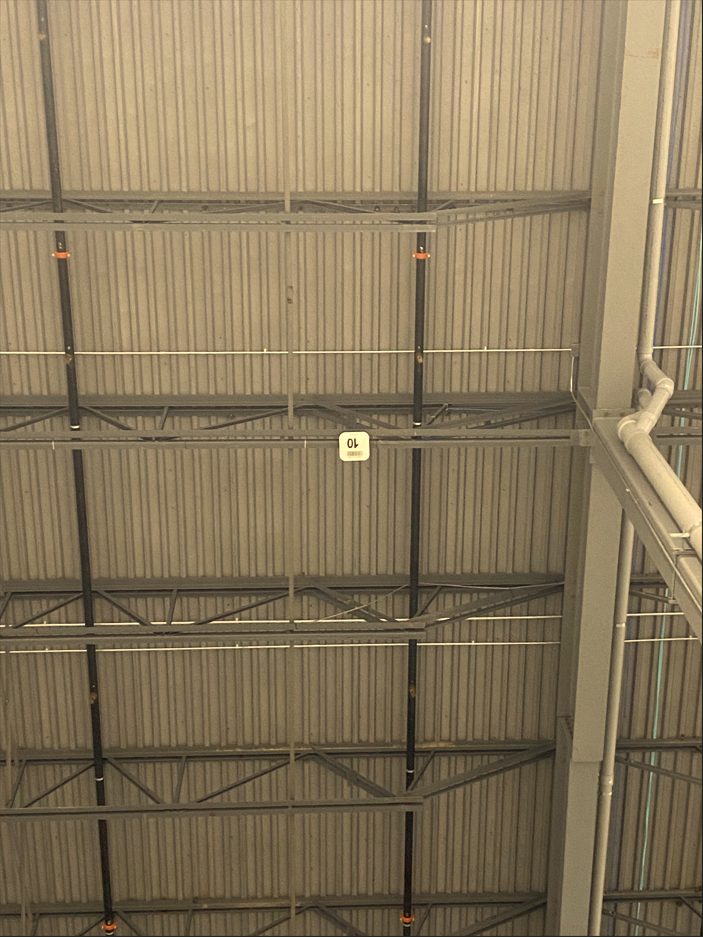
In an office, an access point sits a few metres above your head. In a warehouse, the structural ceiling can be twelve metres or more of open steel. The signal has to travel far further to reach the floor, and all that steel reflects and scatters it along the way.
This is a real access point on a real warehouse ceiling. From the floor it looks close. It is not, and that height changes everything about how the signal behaves by the time it reaches a scanner in someone's hand.
What It Involves
What a Proper Warehouse Deployment Involves
A reliable warehouse network is built in a deliberate order, from the wired backbone outward, and validated against the real building before it ever goes live.
On-Site Wireless Site Survey
Before committing to a design, the building has to be measured in person. An access point on a stick validates real coverage in the real environment, catching interference, ceiling-height loss, and dead spots that a predictive software model cannot see.
Wired Backbone and Rack Layout
Wireless is only the last few metres of a much longer wired journey. The demarcation point, the MDF, and strategically placed IDF racks form the backbone, with every access point running a home run back to a rack. This skeleton is designed first, and the wireless follows.
Access Point Placement and Antenna Choice
Placement is driven by the survey and the building, not by guesswork. High ceilings and steel often require directional antennas and careful channel planning so access points reinforce coverage instead of interfering with one another.
Coverage for Scanners, Forklifts, and Workstations
The network is designed around the machinery of the operation. Roaming devices need overlapping coverage along every path they travel, with no gaps, because a dropped connection on a moving forklift or a scanning worker stops real work.
Edge Coverage for Printers and IoT
Label printers, RFID printers, door controllers, cameras, and time clocks all live at the edges and often have weak radios. Coverage is planned so the weakest device in the building still holds a reliable connection.
Validation Before Go-Live
A warehouse network is verified against the real floor before it goes live, so coverage and roaming are confirmed where it matters. Finding problems before go-live is far cheaper than finding them after.
How We Work
How Vekta IT Approaches a Warehouse Build
The operation drives the design, the building is measured before anything is committed, and the backbone comes before the wireless.
Understand the Operation
We start with what the building actually has to support: the device counts, the forklifts, the scanners, the printers, the workflows, and the physical layout. The operation drives the design.
Survey the Building
We validate coverage on site with an access point on a stick, measuring the real radio environment through the real racking, so the design is built on measurement rather than assumption.
Design Backbone, Then Wireless
We design the wired backbone, rack placement, and cabling first, then place access points and choose antennas around the building and the survey results.
Deploy, Validate, Hand Over
We deploy, confirm coverage and roaming against the live floor, and document the build so the network is supportable long after go-live.
Get Started
Planning or Fixing a Warehouse Network?
Whether you are building new, fixing a deployment that is not performing, or want a proper site survey before you commit, tell us about the facility and we will confirm scope and pricing before any work begins.
Larger industrial sites are quoted on scope. Use the form to start the conversation, or .
Get an Estimate
How would you prefer service?