
How to Design Wi-Fi for a Warehouse (Lessons From a 300,000 Square Foot Build)
Office Wi-Fi and warehouse Wi-Fi are not the same job. They are not even close. I want to say that plainly at the start, because the single most expensive assumption I have seen in this work is that a warehouse is just a big office. It is not. An office has low ceilings, soft walls, and people sitting still at desks. A warehouse has a ceiling four times higher, steel everywhere, racking that swallows signal, and devices that move at speed and cannot afford to drop for even a second. Treat the second like the first and you will fail, and you will spend a lot of money failing.
I learned this on a real build. In 2024 I was part of the team that stood up the network for a brand new 300,000 square foot distribution facility here in Kitchener, from an empty shell to a fully operational site. I supported ten locations across North America, but this one I watched come up from nothing. We had a strong team: ten IT support specialists across North America, two network engineers in Europe, and four regional IT directors. Serious people who knew what they were doing. And we still hit problems we did not see coming. That is the honest part most case studies leave out, and it is the part that will actually help you.
So this is not a glossy success story. This is what a warehouse deployment really takes, where it goes wrong even with good people, and how to plan so the worst of it never reaches your go-live date.
What This Building Actually Had to Support
Before any design talk, you have to respect the scale, because the scale is the whole problem. This was not a handful of laptops. At build-out the facility was designed to support:
- Over 200 staff on the floor and in the offices
- Around 60 handheld barcode scanners
- At least 200 computers and workstations
- 65 printers, broken down as 5 multifunction units, 25 laser printers, 25 label printers, and 10 RFID printers
- 30 door access controllers
- 30 CCTV cameras
- 5 automated forklifts that run on Wi-Fi
- 5 wireless mobile workstations with battery packs
- More than 30 other connected devices, from wall-mounted TVs to time clocks to assorted facility hardware
- 7 IDF racks and 1 MDF tying it all together
Every one of those numbers is a design constraint. The scanners and forklifts decide your roaming strategy. The printers decide how forgiving your coverage has to be at the edges. The cameras and door controllers decide your wired backbone and your power budget. You cannot design the wireless without designing the whole thing, and that is the first place office thinking falls apart. In an office you place a few access points and you are mostly done. Here, the access points are the last decision, not the first.
Start at the Edge: Where the Internet Actually Enters
Everything begins where the ISP hands off to you. This is your demarcation point, the line where the provider's responsibility ends and yours begins, and in a building this size it matters far more than people expect. If this is wrong or fragile, nothing downstream saves you.
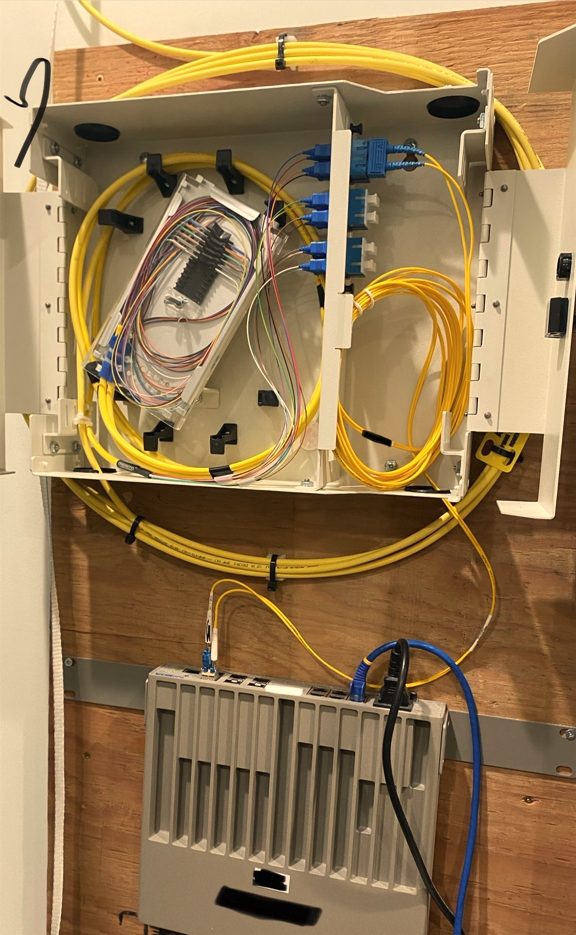 The fiber demarcation enclosure where the ISP handoff enters the building and feeds the MDF. Everything the facility does flows through this point, so it gets planned first, not last.
From this entry point the connection runs into the MDF, the main distribution frame, which is the heart of the network. The MDF is where your core sits and where every one of the seven IDFs comes home to. Get the path from demarcation to MDF clean and resilient, and you have a spine you can trust. Treat it as an afterthought and you have built a mansion on sand.
The Rack and Cabling Layout Is the Real Backbone
People hear "Wi-Fi" and picture the access points on the ceiling. But wireless is only the last three metres of a much longer wired journey. Every access point in that building runs a cable back to an IDF rack, and every IDF runs back to the MDF. The wireless is only ever as good as the wired structure underneath it.
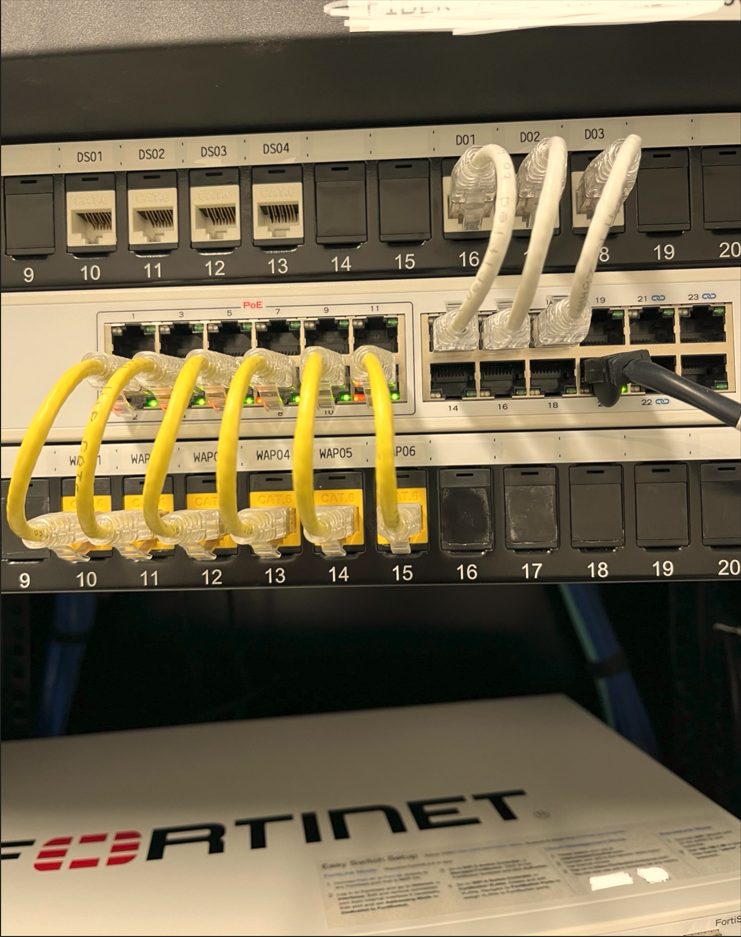 One of the IDF racks. Notice the patch panel ports labeled per access point, WAP01 through WAP06, each one a home run back to the rack. Labeling like this is not decoration, it is what makes the difference between a five minute fix and a five hour hunt when something breaks at 2am.
Seven IDFs were not chosen by accident. In a 300,000 square foot footprint, a network cable can only run so far before the signal degrades, roughly 90 metres for copper before you are out of spec. So you place IDFs strategically across the building so that no device, no access point, no camera, no door controller, is ever too far from a rack. Then every IDF feeds back to the MDF, usually over fiber, because fiber carries that distance without complaint. This is the skeleton. The access points are just the skin on top of it.
If you take one structural lesson from this whole article, take this: design the wired backbone and the rack placement first, around the physical building, and let the wireless follow. Anyone who starts by picking access points is working backwards.
The Ceiling Is the Problem Nobody Plans For
Here is where warehouse work truly separates from office work, and where we got humbled.
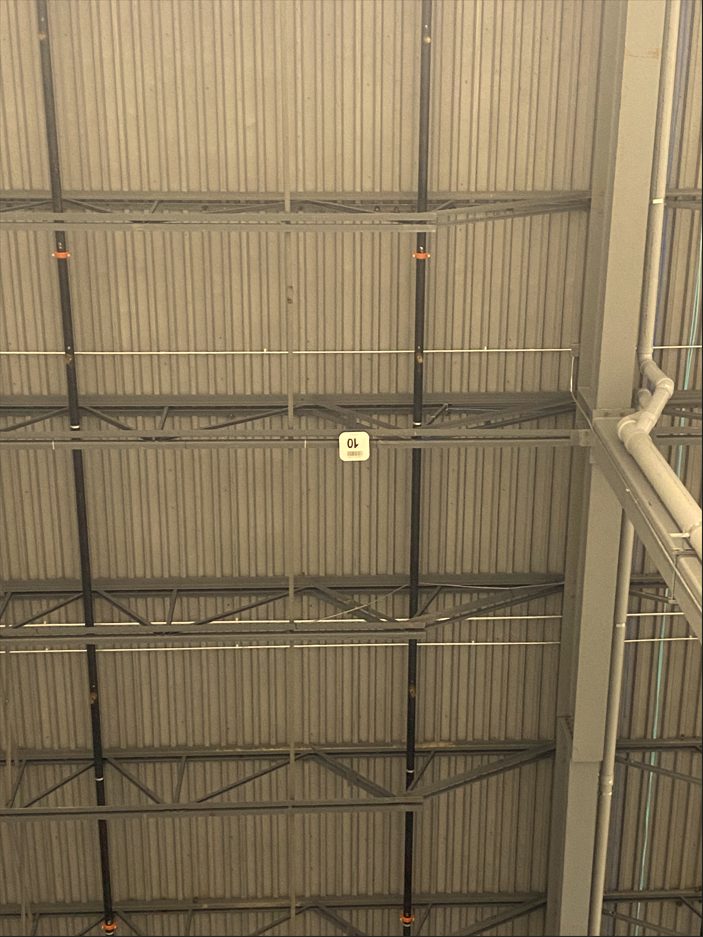 An access point mounted up in the open steel roof structure. From the floor it looks close. It is not. That height, and all that exposed steel, changes everything about how the signal behaves by the time it reaches a scanner in someone's hand.
In an office, the access point sits maybe three metres above your head on a flat ceiling. In a warehouse, the structural ceiling can be 12 metres or more, open steel joists, ductwork, and beams. That height does two things, and both are bad if you ignore them.
First, signal has to travel much further to reach the floor, and it spreads as it goes, so it arrives weaker and wider than you would expect. Second, all that steel reflects and scatters the signal, creating a messy radio environment full of bounce and dead spots. A standard office access point pointed straight down from that height is broadcasting a wide, weak, sloppy pattern by the time it reaches a worker. You often need directional antennas that aim the signal down in a tighter, stronger column instead of letting it splash everywhere. That is a deliberate hardware choice you have to make before you mount anything.
And the ceiling height was not even our worst surprise. The physical location turned out to be unusually prone to environmental radio interference, ambient energy in the area that degraded our RF signals in ways we had not accounted for. You do not find that in a datasheet. You only find it by being on site with the right tools, which brings me to the single biggest lesson of the entire project.
The Site Survey Is Not Optional. It Is the Whole Game.
If I could go back and change one thing, it would be this: do a complete, physical, on-site wireless survey before committing to the design, not after.
There are two kinds of survey, and you need both. A predictive survey is done in software, where you model the building from the floor plans and let the tool estimate coverage. That is a fine starting point and it is genuinely useful for early planning. But it is a model, and a model does not know about local radiation, or the exact way this building's steel scatters signal, or that one corner behaves strangely. Only the physical world knows that.
The physical survey is where you go on site and actually measure. The most valuable version of this is what we call an access point on a stick, an AP on a stick. You take a single access point, mount it on a pole or a tall stand, place it where you think it should go, and you walk the floor measuring the real signal it produces in the real building. You move it, you measure again, you validate every assumption against reality before you buy and mount a hundred of them.
Had we done a thorough AP on a stick validation across that floor before finalizing the design, we would have caught most of what later hurt us. We would have seen the environmental interference. We would have measured how badly the ceiling height weakened the signal at floor level. We would have learned the true coverage of one access point in that specific building, and known how many we actually needed and where. Instead, we found these things out the hard way, after deployment, when fixing them is far more expensive and far more disruptive.
A survey feels like a delay when you are under pressure to open. It is the opposite. It is the cheapest insurance you will ever buy on a project like this.
The Devices Decide Everything
A warehouse network does not exist to serve laptops. It exists to serve the machinery of the operation, and those devices are demanding in ways office gear simply is not.
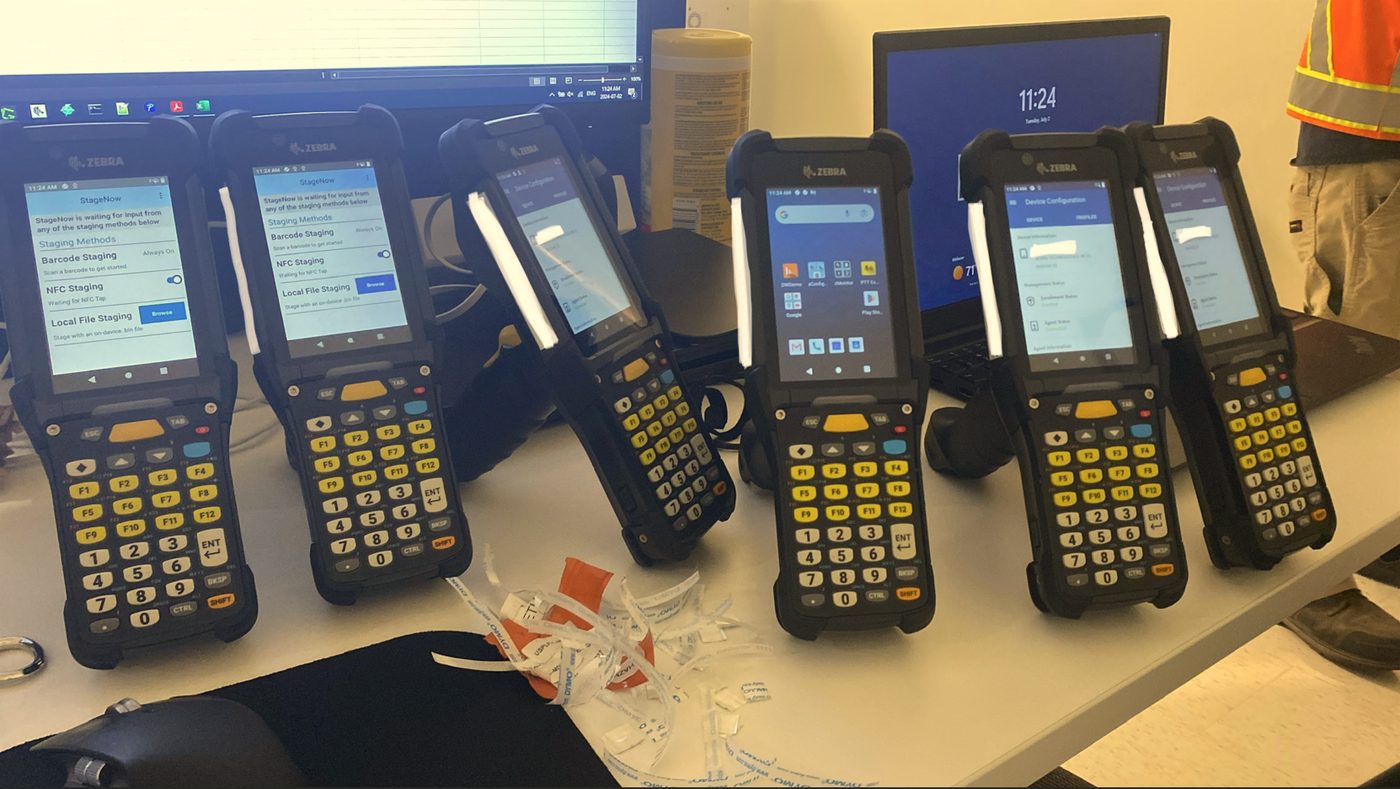 Staging the handheld scanners before deployment. Around Sixty of these had to be configured, tested, and rolled out. Each one lives or dies on clean, uninterrupted Wi-Fi as the worker moves through the building.
Handheld scanners are the lifeblood of the floor. A worker walks the length of the building scanning as they go, and as they move, their scanner has to hand off from one access point to the next without dropping. That seamless handoff, what we call roaming, is one of the hardest things to get right, and a warehouse demands it constantly. If roaming is poor, scans fail, workers stop, and the operation backs up.
Automated forklifts raise the stakes further. Five of them ran on Wi-Fi, moving through the building, and a forklift that loses connection mid-task is not a minor glitch. It is a safety and operations problem. These machines need rock solid coverage along every path they travel, with no gaps, because they are moving fast and they do not get to pause and reconnect.
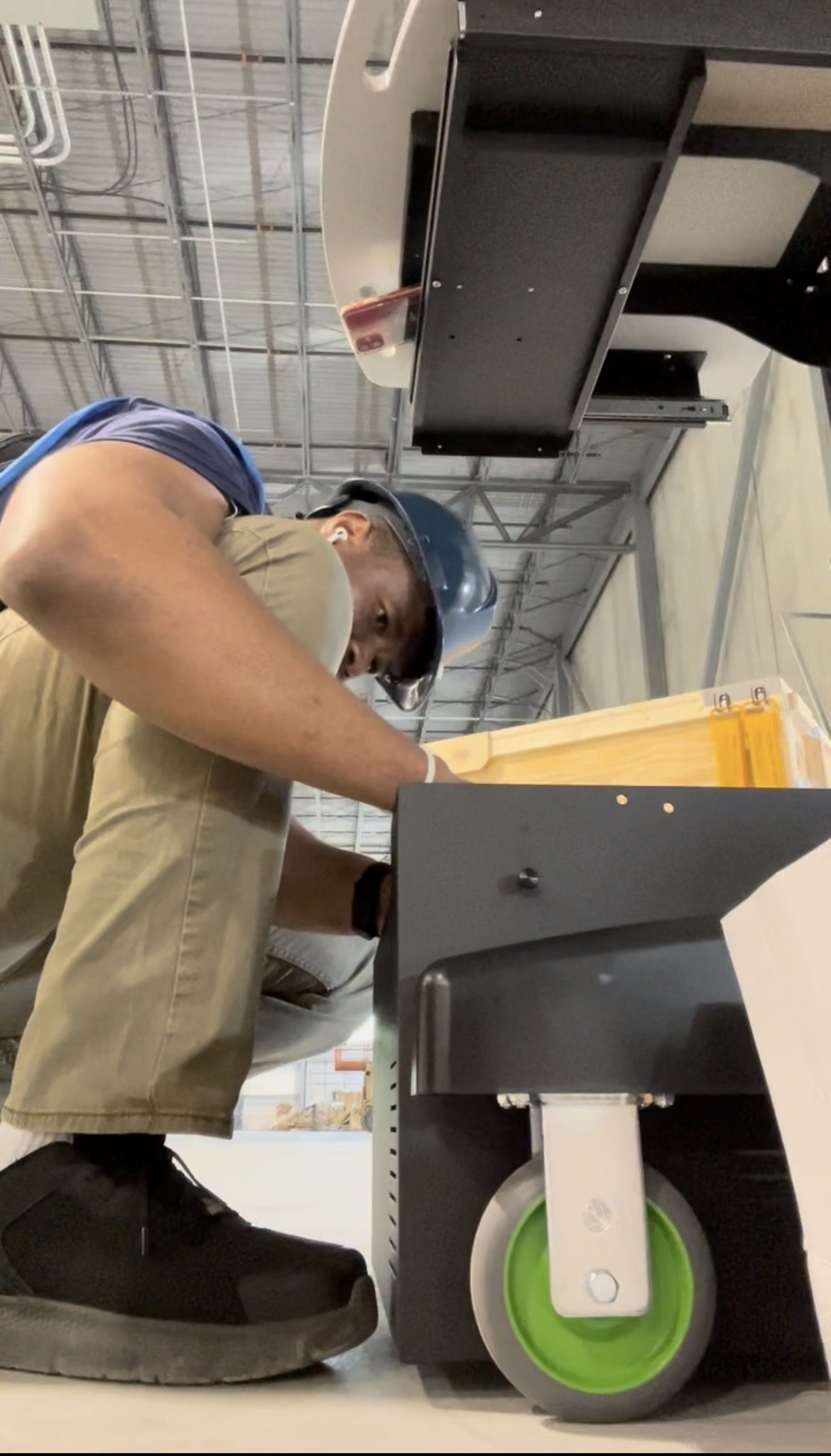 Assembling one of the 5 battery-powered mobile workstations. These roll anywhere on the floor, so they need coverage everywhere on the floor, not just at fixed desks. Mobile by design means there is no such thing as an acceptable dead zone.
Mobile workstations are exactly what they sound like, full workstations on wheels with their own battery packs, designed to be wherever the work is. They are wonderful for productivity and merciless on your coverage plan, because "mobile" means the network has to be solid in every square metre, not just the places you expected people to stand.
Then there are the printers, and these taught us a specific lesson. Label printers, RFID printers, laser printers, multifunction units, 65 of them. The trouble is that many printers ship with weak internal Wi-Fi antennas. They were not built to reach across a steel building to a distant access point. A laptop in the same spot might hold a fine connection while the printer right next to it struggles, purely because the printer's radio is weaker. So your coverage at the floor edges, exactly where printers tend to live, has to be strong enough for the weakest device in the building, not the strongest. Plan for the printer, and the laptop takes care of itself.
Add the door controllers, the cameras, the TVs, the time clocks, and the picture is clear. You are not designing a Wi-Fi network. You are designing a nervous system for a building full of machines that all have different needs, and the wireless has to satisfy every one of them at once.
More Access Points Is Not the Answer
When coverage problems showed up after go-live, the instinct, a very natural one, was to add more access points. Signal weak over here? Add another one. Still patchy? Add another. Solve a quality problem with quantity.
This is a trap, and it is worth understanding why. Wireless access points share a limited amount of airspace, the radio spectrum. Pack too many of them too close together and they start interfering with each other, competing for the same airspace and stepping on each other's signals. This is called co-channel interference, and past a certain point adding access points makes the network worse, not better. You get more hardware, more cost, and lower performance. The floor looks well covered on paper and performs badly in reality.
The real fix is almost never more access points. It is the right access points, with the right antennas, on the right channel settings, placed in the right spots, which you only know from a proper survey. Quality of design beats quantity of hardware every single time. We learned that by doing it the expensive way first.
The Hardest Problem Was Not Technical
I will be honest about the part nobody likes to write down. The most damaging problem on that project was not the ceiling, the interference, or the printers. It was the clash of egos.
When you put a lot of skilled, experienced people on one high-pressure project, strong opinions collide. Engineers in Europe, directors in North America, support staff on the ground, everyone with a view on the right way to do it, and not enough agreement on who decides what. Time and energy that should have gone into solving the actual problems went into the friction between people instead. Decisions stalled. Good ideas got lost in the noise. The network suffered for reasons that had nothing to do with radio waves.
I raise this because it is real and because it is avoidable. A warehouse deployment needs clear technical ownership and a plan everyone has agreed to before the pressure hits, not during it. The cleanest networks I have been part of had one clear architectural vision that everyone aligned behind. The messiest had ten smart people pulling in ten directions. The technology is hard enough on its own. Do not let the human part make it harder.
What I Would Tell Anyone Deploying Warehouse Wi-Fi
If you are planning a deployment like this, here is the honest short version of everything above.
Respect that a warehouse is a fundamentally different environment from an office, and never let anyone treat them the same. Start with the wired backbone, the demarcation point, the MDF, and the IDF placements, and let the wireless follow the building. Do a real physical site survey with an AP on a stick before you commit, because the building will always know things the software model does not. Design for your weakest and most demanding devices, the roaming scanners, the moving forklifts, the printers with feeble antennas, not for a laptop sitting still. Resist the urge to fix quality problems by throwing more access points at them. And get your people aligned behind one clear plan before the pressure arrives, because ego costs more than hardware.
We had a strong team and we still learned most of this the hard way. There is no shame in that, but there is no need for you to repeat it either.
Getting It Right the First Time
A warehouse network is one of the most demanding builds in this field. The ceilings, the steel, the moving machinery, the sheer number of devices, the cost of a single dropped connection on a live floor, it all stacks up into something that genuinely punishes guesswork. I have been through it, including the mistakes, and that experience is exactly what lets me see these problems coming before they reach your go-live date.
I am a network engineer based in Kitchener-Waterloo, Ontario, and I help warehouses, distribution centres, and industrial facilities across Ontario design and deploy Wi-Fi and network infrastructure that actually holds up to the floor. Whether you are building new, fixing a deployment that is not performing, or just want a proper survey before you commit, see how I can help with your warehouse and industrial network.